
Wholesale order tracking: Excel or a customer portal?
Track wholesale orders with a free Excel template, a worked example and clear checks for deciding when your business needs a B2B customer portal.
 Open full-size image
In this guide
Start with one order everyone can identify
A customer sends a product list on WhatsApp, changes a quantity by email and calls to ask when the rest will ship. Each message makes sense on its own. The difficult part is knowing which version the team should act on.
For a small wholesaler, Excel and messaging can be a sensible starting point. Before buying software, give every request one reference, record quantities in a consistent unit and name the person responsible for the next step. A customer portal becomes useful when maintaining that shared record takes more effort than the team can reliably handle.
This guide works through a fictional laboratory-supply order. You can adapt the same tracking method to other standard products. It does not cover laboratory analysis, clinical records or regulated product traceability.
Keep requests, approvals and shipments separate
An enquiry is not an approved order. A quote being sent does not mean the customer accepted it. A parcel leaving the warehouse does not mean the whole order arrived.
Use these five checkpoints, with evidence for each change:
| Checkpoint | What needs to be recorded | What moves it forward |
|---|---|---|
| Request received | Customer reference, product code, quantity and pack size | Missing details clarified |
| Quote sent | Version, quantities, price basis, currency, delivery assumptions | Customer accepts that version |
| Order confirmed | Approved lines and any agreed changes | Dispatch is authorized |
| Part dispatched | Quantity actually sent on each line and dispatch reference | Remaining lines are resolved |
| Closed | Fulfilment or cancellation is recorded for every line | No open commitment remains |
Keep payment and receipt confirmation in separate fields if you track them. Neither follows automatically from a shipping status. A delivery date should be labelled requested, estimated or confirmed so the reader knows what it means.
A three-product example
Suppose a fictional customer, Sample Lab A, sends request DEMO-104. The first message asks for three packs of vials. A later message changes that to two. The customer then accepts quote version 2, which records the revised quantity.
The product codes and quantities below are invented for this example. They are not current stock, prices or purchasing recommendations.
| Product | Pack size | Approved packs | Approved units | Units dispatched | Units still to dispatch |
|---|---|---|---|---|---|
| VIAL-2ML | 100 | 2 | 200 | 100 | 100 |
| TIP-200 | 960 | 1 | 960 | 0 | 960 |
| FILT-022 | 100 | 3 | 300 | 200 | 100 |
For each line, approved packs multiplied by units per pack gives approved units. Approved units minus dispatched units gives the remaining quantity. Do not add the three remaining quantities into a meaningful “stock total”: they belong to different products.
Keep the earlier request and the accepted version rather than silently overwriting the history. Record the customer's agreement before a partial shipment or substitution. If only two filter packs were approved, the third pack would remain an unconfirmed request, not an outstanding approved order.
Use the downloadable tracking sheet
Download the order-tracking workbook
The workbook contains the three fictional lines above, editable inputs and calculated unit quantities. Use one row per order line, not one row per customer. Clear the sample inputs before entering real work, and copy a full formula row when adding a line. This is a shared-record starting point, not a live inventory or accounting connection.
Keep a separate order reference, quote version, customer approval, owner and next action. Record cumulative dispatched units only after checking dispatch records. If returns or cancellations occur, document the adjustment separately; do not turn a negative balance into a quiet zero.
For the customer-facing confirmation, adapt this short template:
Request reference:
Quote version:
Product codes, pack sizes and quantities:
Agreed price basis and currency:
Shipping and other charges included or still pending:
Delivery estimate or confirmed date:
Partial shipment or substitution agreement:
Please confirm this version or tell us what needs changing.
When prices need comparison, use the separate guide to comparing supplier quotations. Do not treat a missing shipping charge as zero or compare a pack price with a unit price.
When a spreadsheet is enough
A sheet can work well when one person owns the record, updates happen promptly and the team can find the accepted version without searching multiple chats. A versioned shared file is usually easier to maintain than separate emailed copies. Set access deliberately; a customer should never receive a workbook containing other customers' orders.
There is no universal order count at which Excel stops working. Watch what actually happens in your process:
| Situation | Improve the sheet first | Consider a customer portal |
|---|---|---|
| Product enquiries | Standardize codes and pack units | Customers need to browse and submit their own requests |
| Several people handle a request | Assign an owner and next action | Sales and customers need a shared view of progress |
| Quote changes | Keep version and approval records | Repeated changes are hard to reconcile across channels |
| Partial shipments | Track quantities for each line | Keeping customer and team views aligned is becoming unreliable |
Test these observations on a few recent, anonymized orders. A portal is justified by the workflow it improves, not by having more features on a comparison page.
What to try in the Supply demo
Tenrook Supply brings the catalogue, customers, stock and order requests into a workspace configured around a business. The screenshot below is the actual English demo interface with fictional records; its numbers are separate from DEMO-104 above.
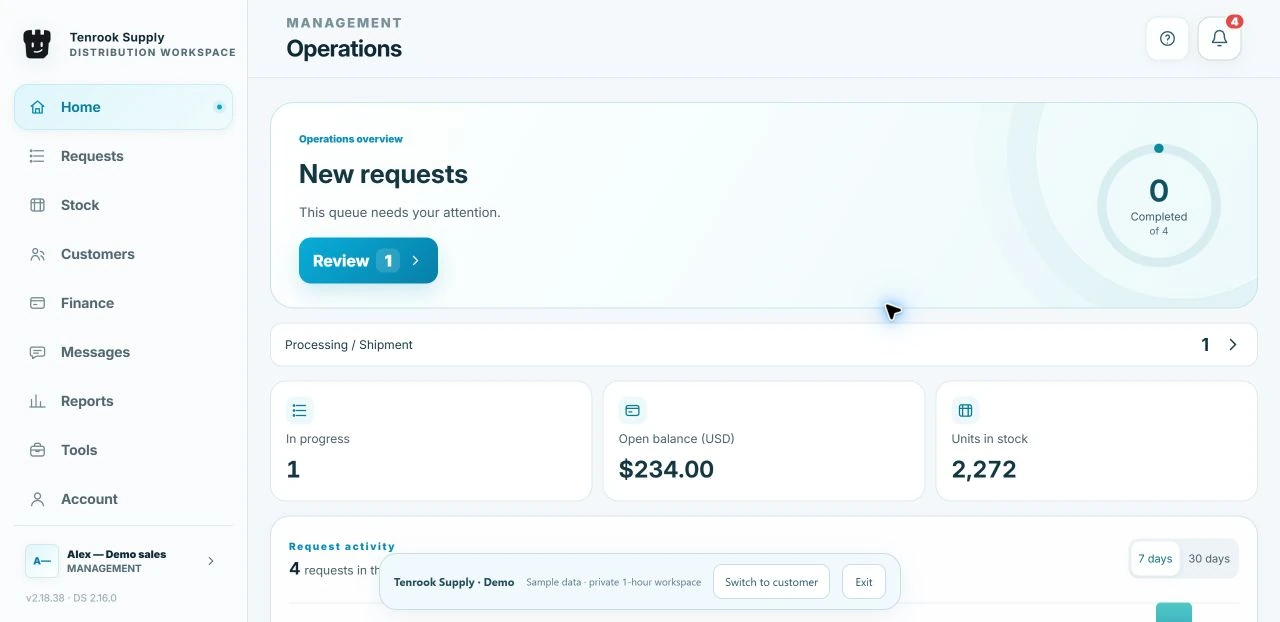
In the Supply demo, start by comparing the team view with the customer view. Look at how a customer finds a product and how the team reviews a request. Then check the Supply product page against your own process.
The demo does not establish an automatic connection to your WhatsApp, Excel, accounting software or real stock. Those requirements need to be discussed and verified for your setup. Keep real customer information out of the public demo.
Make one decision after a small trial
Choose three representative requests: one straightforward order, one revised quote and one partial shipment. Run them through your current tracking method using sample data. Ask another person to identify the accepted quantity, what has shipped and who acts next without asking you to explain the record.
If the answers are easy to find, keep the simpler method and improve it. If the same gaps recur, use those exact cases in a product demo. You will have a specific brief rather than a vague request for “better order management”.
The next useful step is small: download the sheet, enter one anonymized request and check whether someone else can follow it from enquiry to closure.
Put the guide into practice
Choose the tool that fits the decision in front of you.
Explore tools